
Start with one place
Found a cafe in a conversation or a park for your next walk? Save its public link and choose Places. Import can fill in available details; check the address before saving. A chain’s homepage may describe a different branch.
Review the pin as well as the name. If the source does not provide exact coordinates, choose a point on the map yourself. A card can stay in your collection without coordinates, but it needs a pin to appear on the map.
Open your place in a maps app
Select a saved place or its pin, then choose Open in maps. You can continue in Google Maps, Apple Maps, OpenStreetMap, Yandex Maps or 2GIS.
- Choose the specific place before opening an external map.
- Use the external service for routes, transport and navigation.
- Check the address and entrance before you travel.
Choose a place for the day
Open your saved places when you have a free afternoon. Keep a short note about what you want to try, who you would like to invite and how long to allow.
VIOTray keeps your ideas together. Confirm opening hours, tickets, availability and current prices with the venue before making the trip.
Keep the conversation beside the idea
Share a place with your group, collect reactions and discuss the details in comments. Once you agree, create a plan and ask people to confirm attendance. The place stays connected to the plan.
Organise places around real occasions
Use folders for a weekend, a trip or a neighbourhood you want to explore. Cafes, museums and parks can sit together in the same folder. After visiting, keep your personal progress and impressions for next time.
Try a New York afternoon
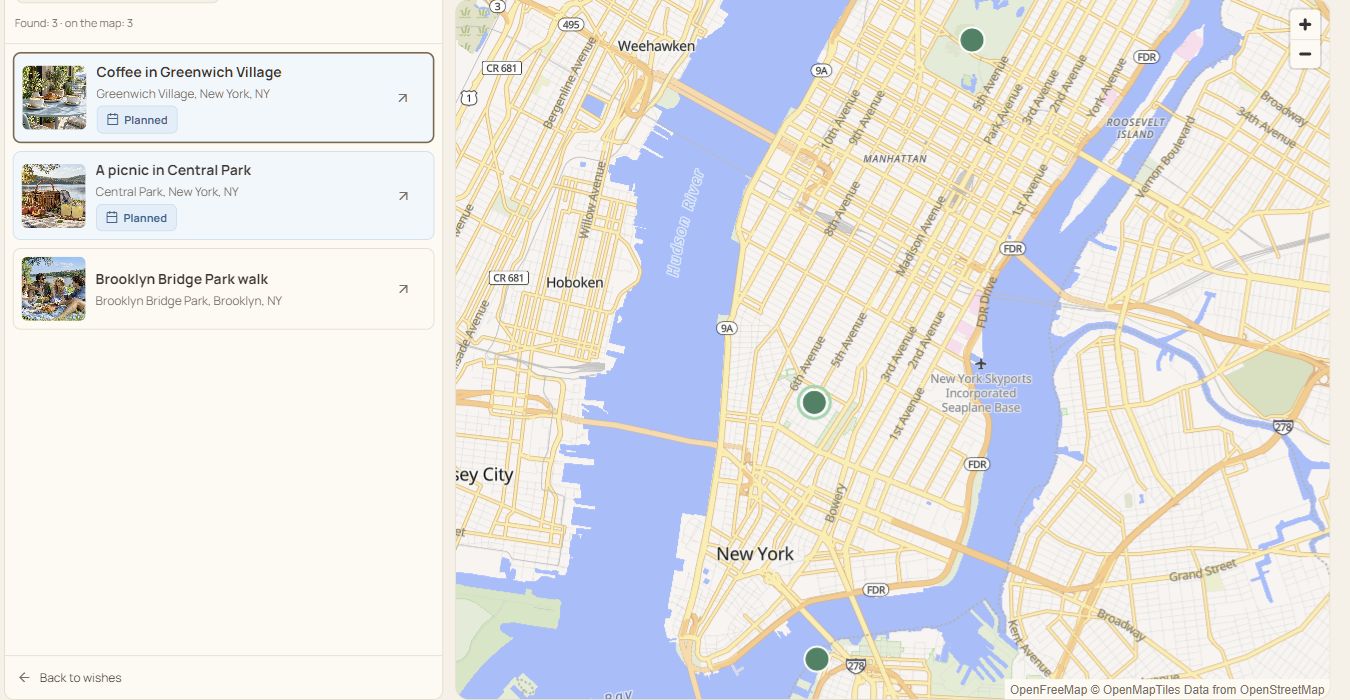
Save a coffee in Greenwich Village, a picnic in Central Park and a walk in Brooklyn Bridge Park. Use All pins to compare their locations, then choose one idea for your next outing.
These are sample ideas. Check the exact address and travel time for the place you choose.